
Monsta Probe: Installation
A Monsta Probe is a local collection software designed to be installed directly on Windows servers and devices (coming soon for Linux and Raspberry PI). Its main function is to collect performance, health and availability metrics from the host system, acting as a native collection extension for the Monsta platform.
Installing the Probe (Windows)
Section titled “Installing the Probe (Windows)”- Download the probe program on the Windows operating system you want to monitor;
| Download | |
|---|---|
 | https://www.monsta.com.br/monsta/download/MonstaProbe.msi |
- Logged in with an administrator account, run the installer “monstaprobe.msi”;
- Configure the port and password parameters that will be requested during installation.
Installation via command line
Section titled “Installation via command line”The MonstaProbe.exe installer accepts options on the command line. You can use them to automate installation across a network via GPO, without the need to interact with the graphical interface.
| Option | Description |
|---|---|
AGREE=Y | Accepts the probe’s terms of use. |
PORT=<num> | Specifies the port to be used by the probe. If not provided, the default will be 7743 (TCP). |
PASSWD=<password> | Sets the password to be used by the probe. |
REMOTE_EXEC=1 | Enables the execution of commands and scripts in PowerShell. Use 1 to enable or 0 to disable. |
Example usage:
msiexec /i MonstaProbe.msi /qn AGREE=Y PORT=7743 PASSWD=MinhaSenha REMOTE_EXEC=1Commands to change configuration
Section titled “Commands to change configuration”The probe parameters can be adjusted via the command line.
| Option | Description |
|---|---|
--cfg | Indicates that the configuration will be changed. |
--port | Redefines the port the probe should listen on. |
--passwd | Redefines the password. |
--remote-exec 1 | Defines whether the execution of PowerShell commands and scripts is enabled. Use 1 to enable and 0 to disable. |
Example usage:
"C:\Program Files (x86)\MonstaProbe\monsta_probe.exe" --cfg --port 7744 --passwd NovaSenha --remote-exec 1Remote Script Execution: Security and Permissions
Section titled “Remote Script Execution: Security and Permissions”Execution of PowerShell commands and scripts through the Monsta Probe is performed under the exclusive context of the local user monsta-probe. This user is created automatically during installation and operates strictly with standard user permissions, ensuring that all services, tasks and scripts triggered by the platform run in isolation, without administrator privileges or access to sensitive operating system files.
Configuration in Monsta
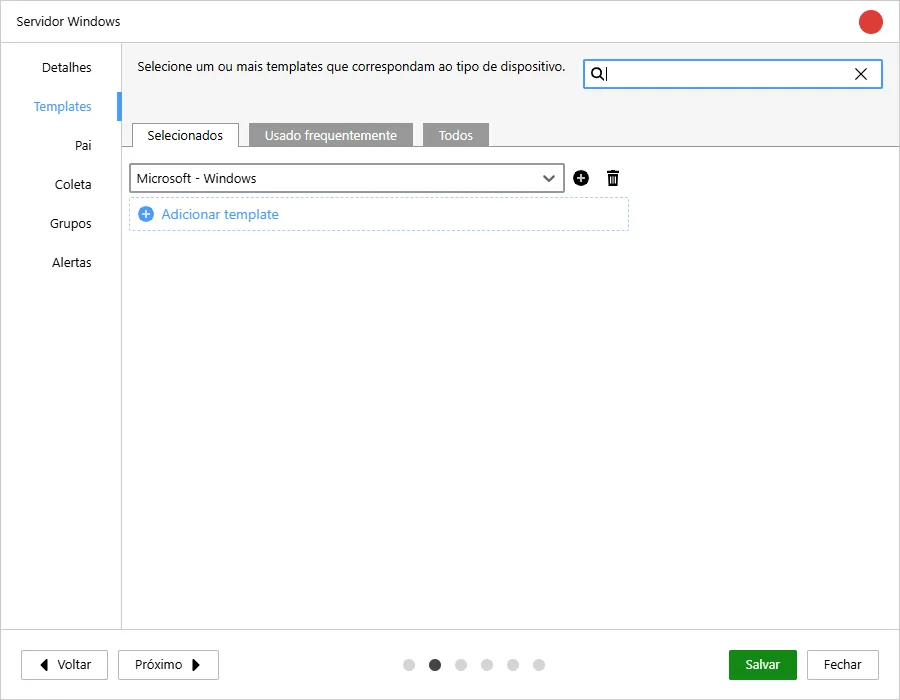
Section titled “Configuration in Monsta”Within Monsta, when creating a device, simply configure it to use the Microsoft templates.
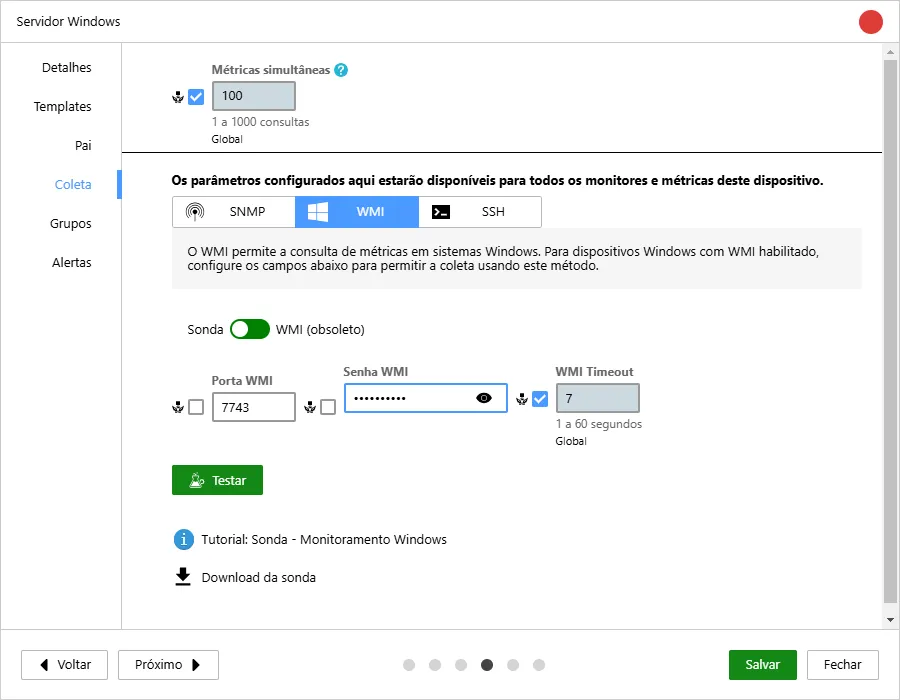
And fill the field “WMI User” with any information (it will be discarded later) and the field “WMI Password” with the password provided during the probe installation.
After creating the device you can use the monitors available in the template.
Features and Technical Capabilities
Section titled “Features and Technical Capabilities”1. Passive Architecture (On Demand)
Section titled “1. Passive Architecture (On Demand)”The probe operates strictly under a passive request-and-response model. It does not initiate communications on the network autonomously; data traffic occurs only when Monsta contacts it to perform polling (collection request).
2. Integration with the WMI API (Windows)
Section titled “2. Integration with the WMI API (Windows)”In Microsoft environments, the probe natively uses the WMI (Windows Management Instrumentation) API, allowing extraction of detailed performance counters from servers and workstations without the need for complex remote management configurations on the network.
3. Command and PowerShell Script Execution
Section titled “3. Command and PowerShell Script Execution”The probe acts as an automation arm directly on the host operating system.
- Local Commands: Can execute commands directly on the host operating system.
- PowerShell Scripts: Supports triggering custom scripts, allowing monitoring of specific applications or creating custom validation routines.
4. Physical Disk Health Diagnostics
Section titled “4. Physical Disk Health Diagnostics”The software is capable of reading hardware indicators and the health status of hard drives and SSDs installed on the device. This enables early identification of physical failures (bad blocks) and storage degradation.
5. Encrypted Communication
Section titled “5. Encrypted Communication”All information exchange between the central Monsta server and the Probe installed on the device is 100% encrypted, ensuring the security of transmitted metrics and preventing interception of sensitive infrastructure data.