
How do I change the types of emails I receive about my account?
The Monsta Customer Area allows you to manage and customize the communications and notifications you want to receive by email about your account. Follow the steps below to adjust your preferences:
Step-by-step to change your email notifications
Section titled “Step-by-step to change your email notifications”1. Access Account Preferences
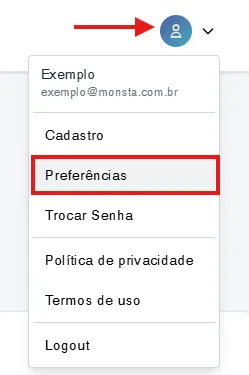
Section titled “1. Access Account Preferences”On the Customer Area, click the profile icon located in the top right corner of the screen and select Preferences from the drop-down menu.
2. Change the content options for email notifications
Section titled “2. Change the content options for email notifications”On the preferences page, scroll down to the Email notifications section (located just below the access email change block).
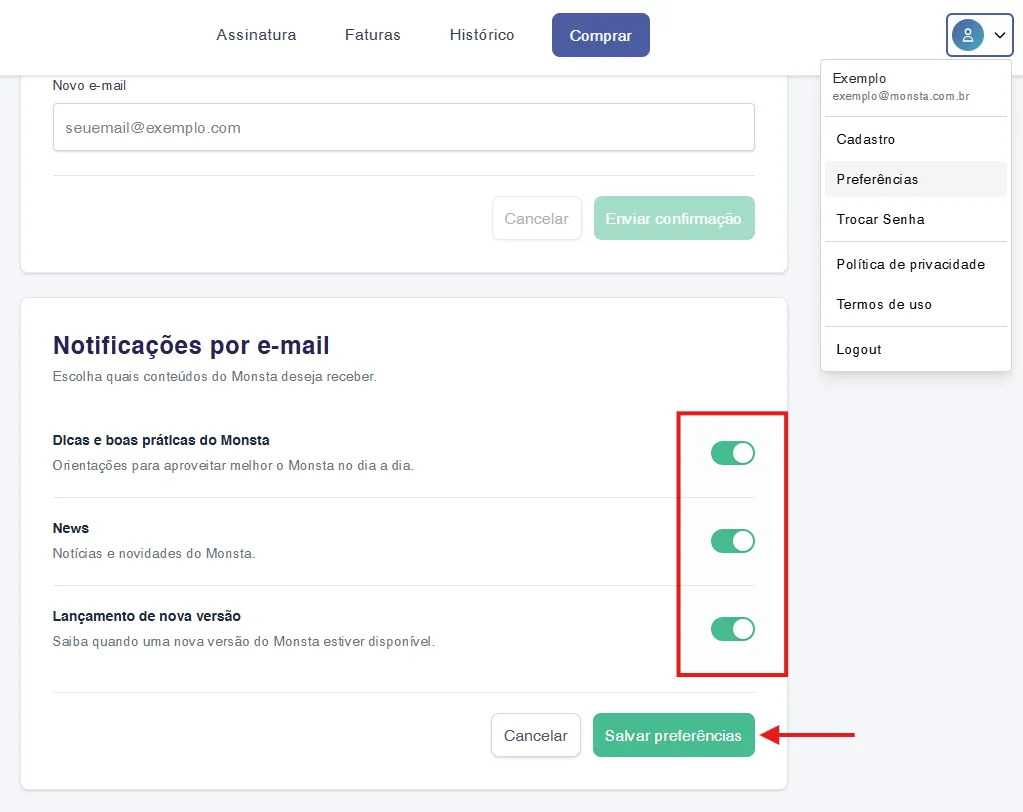
Use the toggle switches next to each option to enable or disable the types of messages you want to receive:
- Monsta tips and best practices: Guidance and recommendations to make the most of the features in day-to-day use.
- News: General news and updates about Monsta.
- New release: Alerts and notices about system update releases.
3. Save the changes
Section titled “3. Save the changes”After adjusting the switches according to your preference, click the Save preferences button.
Done! Your preferences have been saved and you will start receiving only the selected communications.